Product
Define how your organization runs. Resource it, document it, verify it, improve it. Each stage feeds the next: define a process once and the audit, the gap analysis, the calibration register and the corrective actions all inherit it. Built against AS9100D, AS9120B and AS9110C — and ISO 9001:2015 on its own, if that's the only standard you hold.
JBird comes in two options. The quality system is a 39-module build — everything on this page except the six that make up Production. Add Production / Operations — Bills of Material, Inventory, Purchasing, Routers, Work Orders and Travelers — when you run parts through a shop, and the count goes to 45. The demos on this site show the 39-module quality system with Production switched off.
What your organization does, who it does it for, and what it has committed to. This is where onboarding starts — and JBird starts empty on purpose, because no two organizations map the same way. Empty, but not unhelpful: a template pack gives you the documents every quality system needs, scoped to your standards, before you write a word.
Step 0 · the first click
Starting empty is honest, but it shouldn't mean starting from nothing. Tick the standards you're certified to, press the button, and JBird sets that as your scope and writes five starter documents — QMS Scope Statement, Internal Audit Procedure, Management Review Procedure, NCR/CAPA Procedure and Document Control Procedure — each already scoped to just the standards you picked, not a generic pack with the irrelevant clauses left in.
Running it again is safe. It fills in whatever is still missing and will not touch, regenerate or duplicate a document you have already written or edited. That matters more than it sounds: the reason people don't press buttons like this in other systems is that they can't tell what it will overwrite.
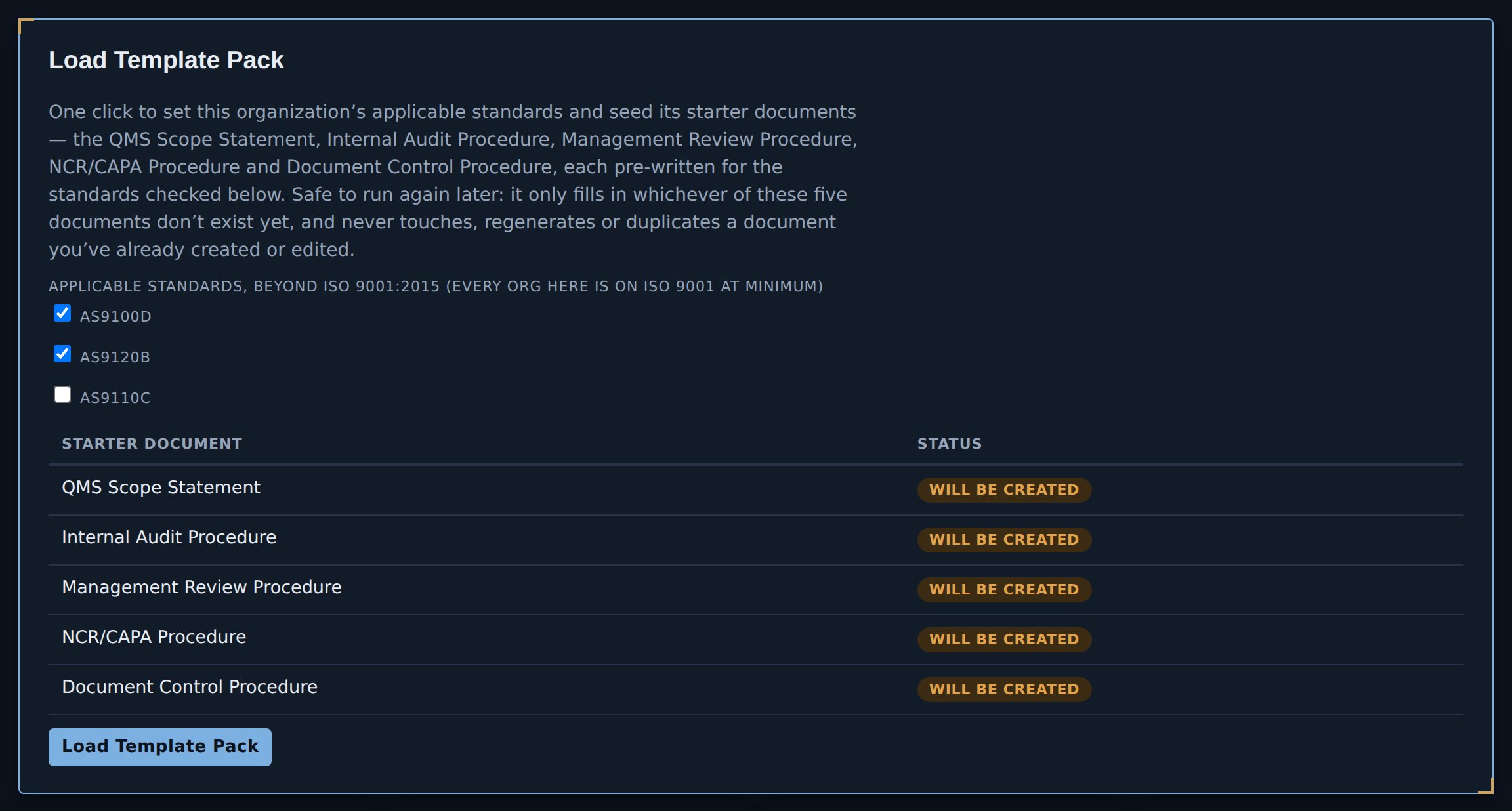
Click to enlarge.
Step 0 · the other first click
The honest objection to any new QMS is not whether it can hold your records. It's the fortnight of retyping between deciding to switch and having anything useful in it. So there's a wizard per entity — people and training, suppliers, equipment and calibration, documents, NCR/CAPA history, customers — that takes a CSV out of whatever you keep now: paste it or upload it, map your columns to JBird's fields, and look at exactly what will happen before anything is written.
Three things about it are deliberate. It never guesses at your data: column suggestions come from exact header names, never from reading the values, because a mapping that is silently wrong is worse than one you had to make yourself. Re-running the same file is safe — duplicates are detected and skipped, with a toggle if you meant it. And a document imported with a historical approver and date gets a real, dated approval record, the same shape as if somebody had clicked Approve at the time, rather than an "Approved" badge with nothing behind it. Historical nonconformances get real NCR numbers in the same sequence as the ones you'll raise next week.
The quick "Import a List" button on Customers and Suppliers is still there and still faster when all you have is a column of names. This is for the rest of it.
And it runs in both directions. Every register has an Export to Excel button that writes a real .xlsx workbook — the full list for that register, not just whatever filter you happen to have on screen, because a partial export is the kind of thing that goes unnoticed until an auditor asks why a record is missing. The spreadsheet library is built into the page rather than fetched from anywhere, so export works on a locked-down shop network, and on a machine with no network at all. You can try it right now in the demo.
There is also one button for everything. A full export downloads a single ZIP: every record as JSON, one CSV for each kind of record, and every file attached to a record exactly as it was uploaded, with a manifest that lists each file, the record it belongs to and its SHA-256, and marks any file it could not fetch as not included rather than leaving it out silently. When people sign in to a hosted deployment, the exports on that screen are for the organization’s Admin.
This matters more than a convenience feature. You are being asked to keep records in here that you will be audited against for years, and the reasonable question is what happens if you want to leave. The answer is that everything comes out as files you can open in Excel, without asking us.
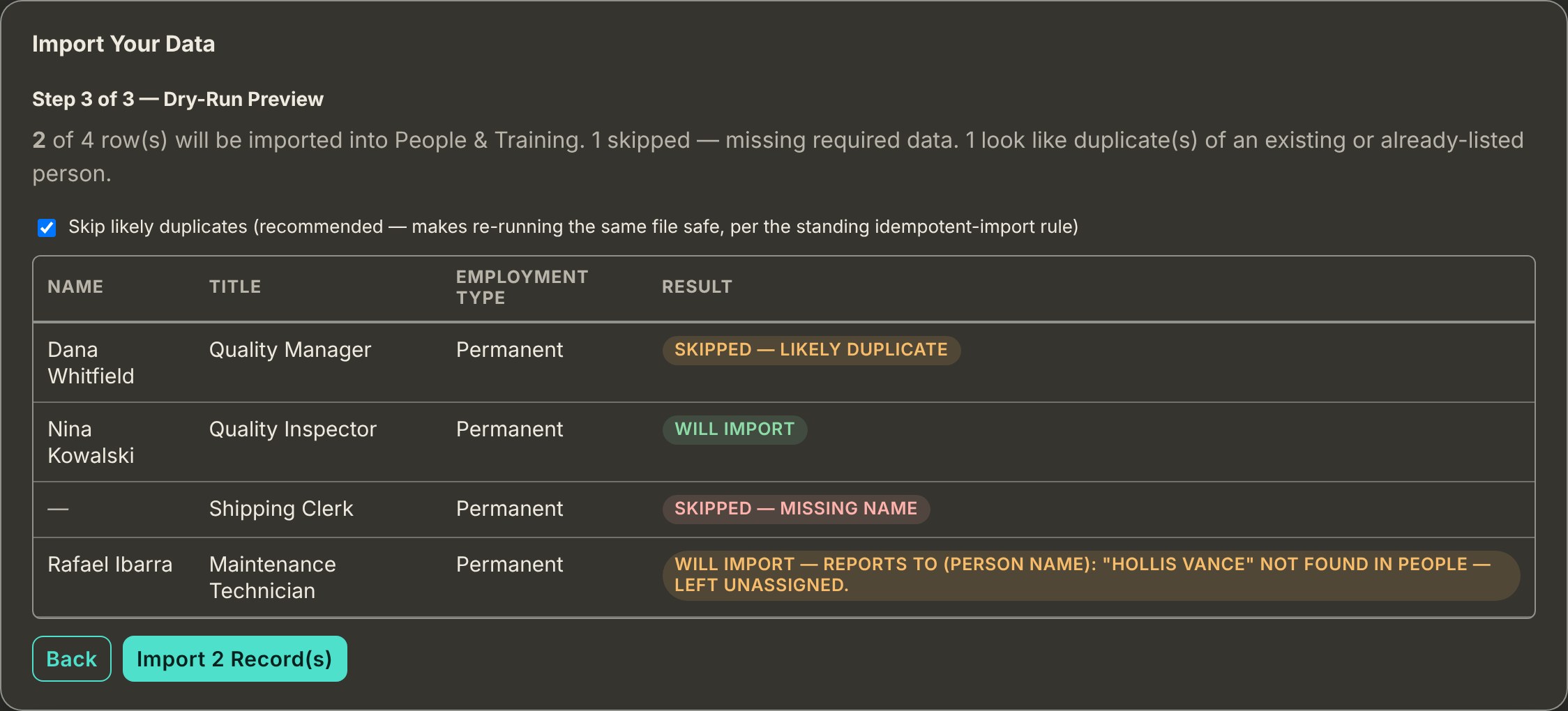
Nothing is written until you press the button, and the button tells you how many records it will write. Click to enlarge.
Step 1 · before you draw anything
A blank process map is the hardest screen in any quality system, and the usual failure isn't blankness — it's copying someone else's twelve processes because they came in a template. Pick the shape closest to yours and JBird seeds a complete starter map: processes, sub-steps, interactions with what flows between them, owners, KPIs, resources and training requirements. Then you edit it into your own.
What makes it worth having is what the panel says before you pick. A process is only its own process if someone is primarily executing it; otherwise it's an activity inside a broader one. Two of the archetypes apply that rule to the same question — purchasing — and land on opposite answers: a machining shop with no purchasing manager folds it into Operations, while a distributor whose whole business is buying gives it its own owner and its own KPIs. The third applies it to a different question. A design-and-build shop employs engineers, so Design & Development is a process of its own rather than something folded into contract review. Each card says which way it went and why.
So when you then split or merge something, you're making an informed choice against a named rule rather than guessing — which is the difference between a template library and one that teaches you something. Applying is safe on a map that already has processes: it adds only what isn't there, and never touches anything you've renamed or edited.
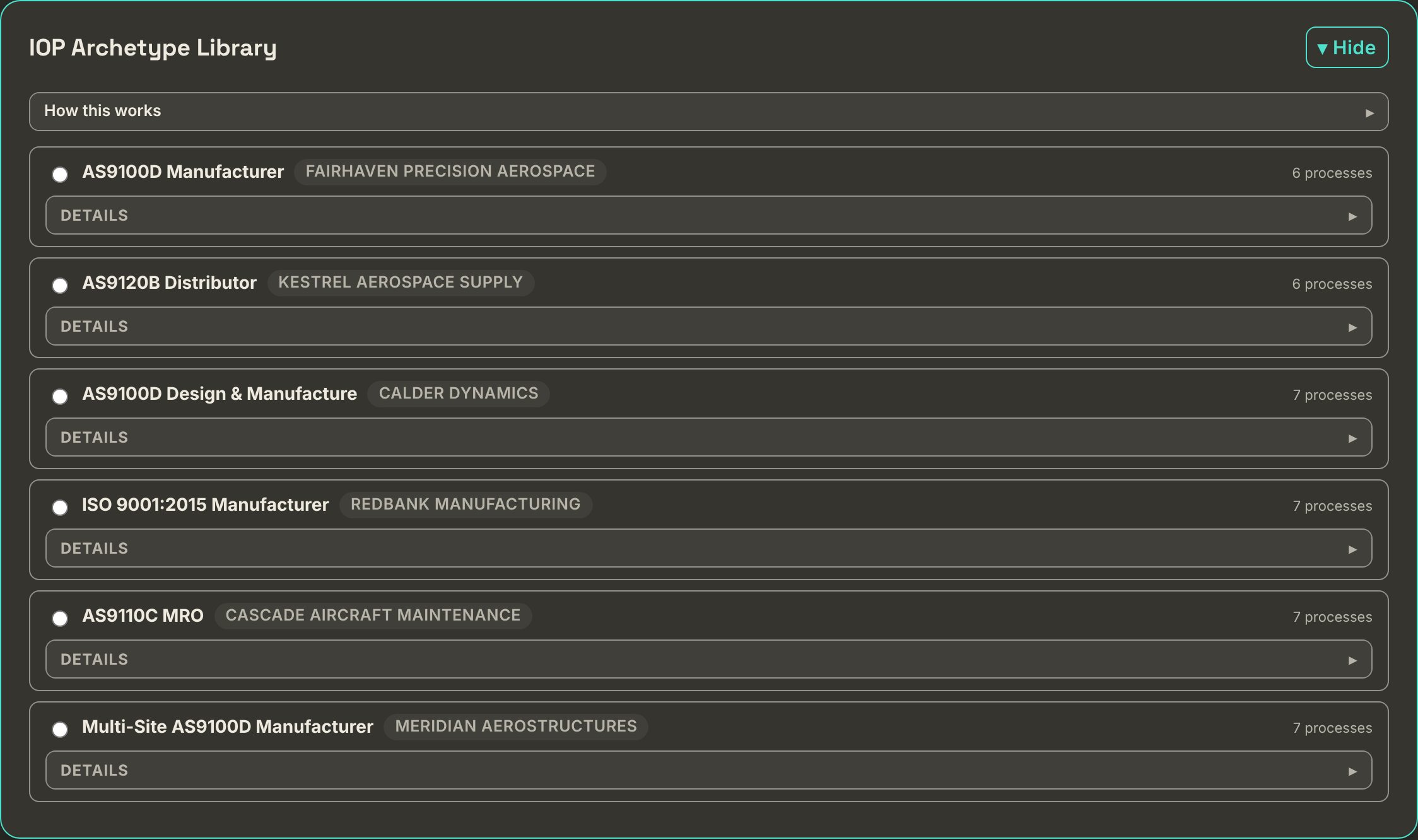
Click to enlarge.
Step 1 · where the app opens
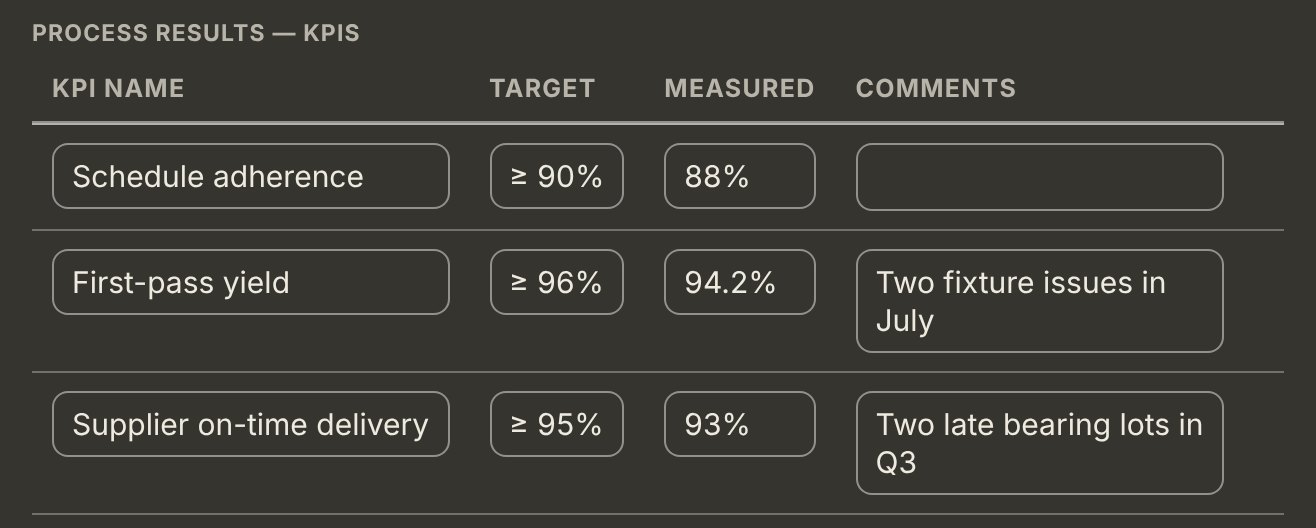
A builder, not a fixed diagram. Add your processes, group them into categories you control, and define what flows between them. The diagram draws itself from that data — the core flow lays out as a single left-to-right spine, category zones enclose what belongs to them, and support processes sit in their own zone below — drawn as full processes, but deliberately not wired to individual core processes, exactly as a real AS91xx process map does it. Each box carries its own activities as a short list, so the map shows what every process does without a word of text floating on the arrows.
Each process carries what an auditor expects to be shown — Inputs, Activities and Outputs, all required — plus its owner and team, its applicable standards and clauses, its equipment and operating environment, its audit interval, and the training its team needs. Its KPIs carry a monitoring plan rather than just a number: how each one is measured, how often, and when it was last analysed, which is what clause 9.1.1 actually asks for. Everything downstream reads from here.
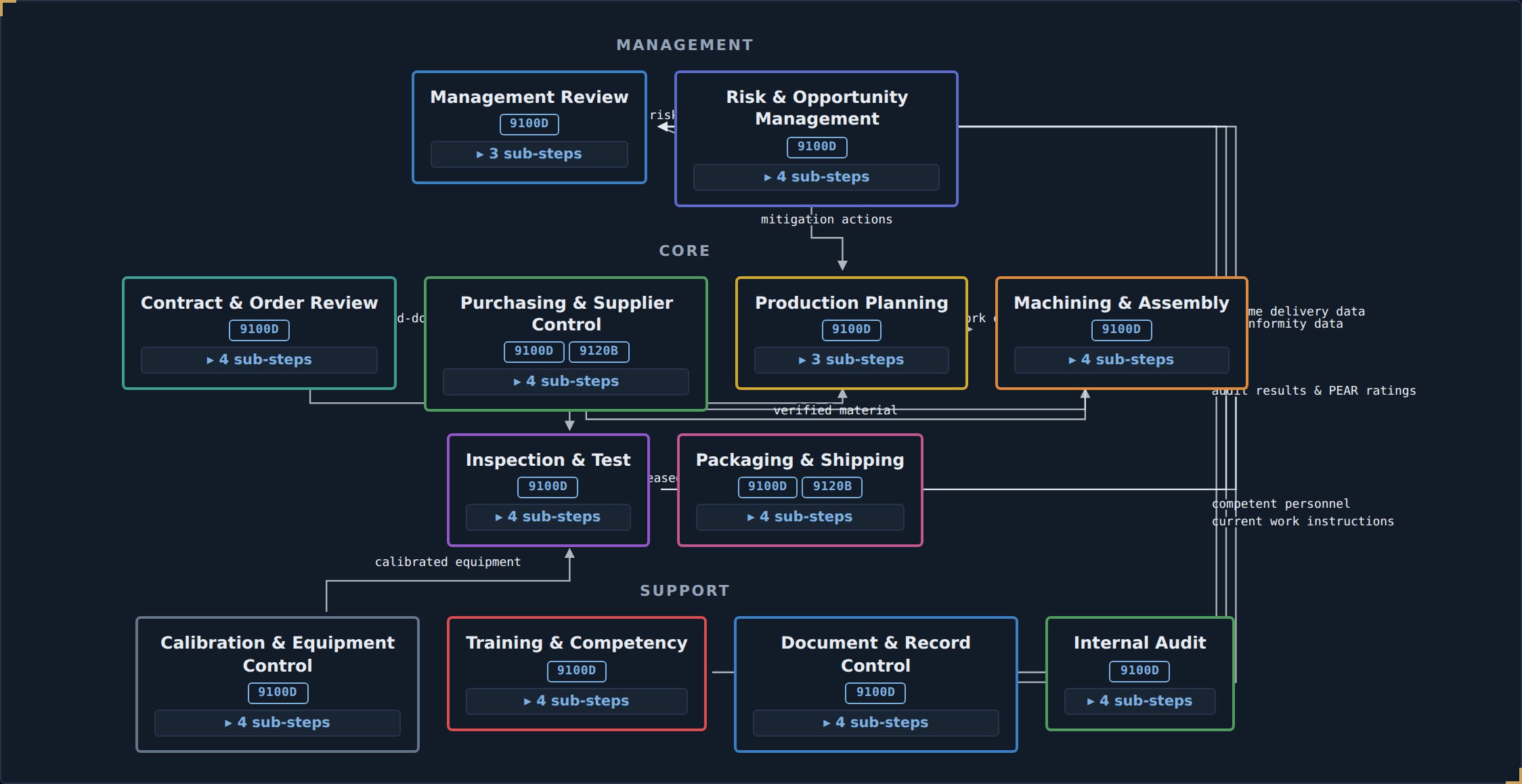
Click to enlarge.
Step 1, one level down
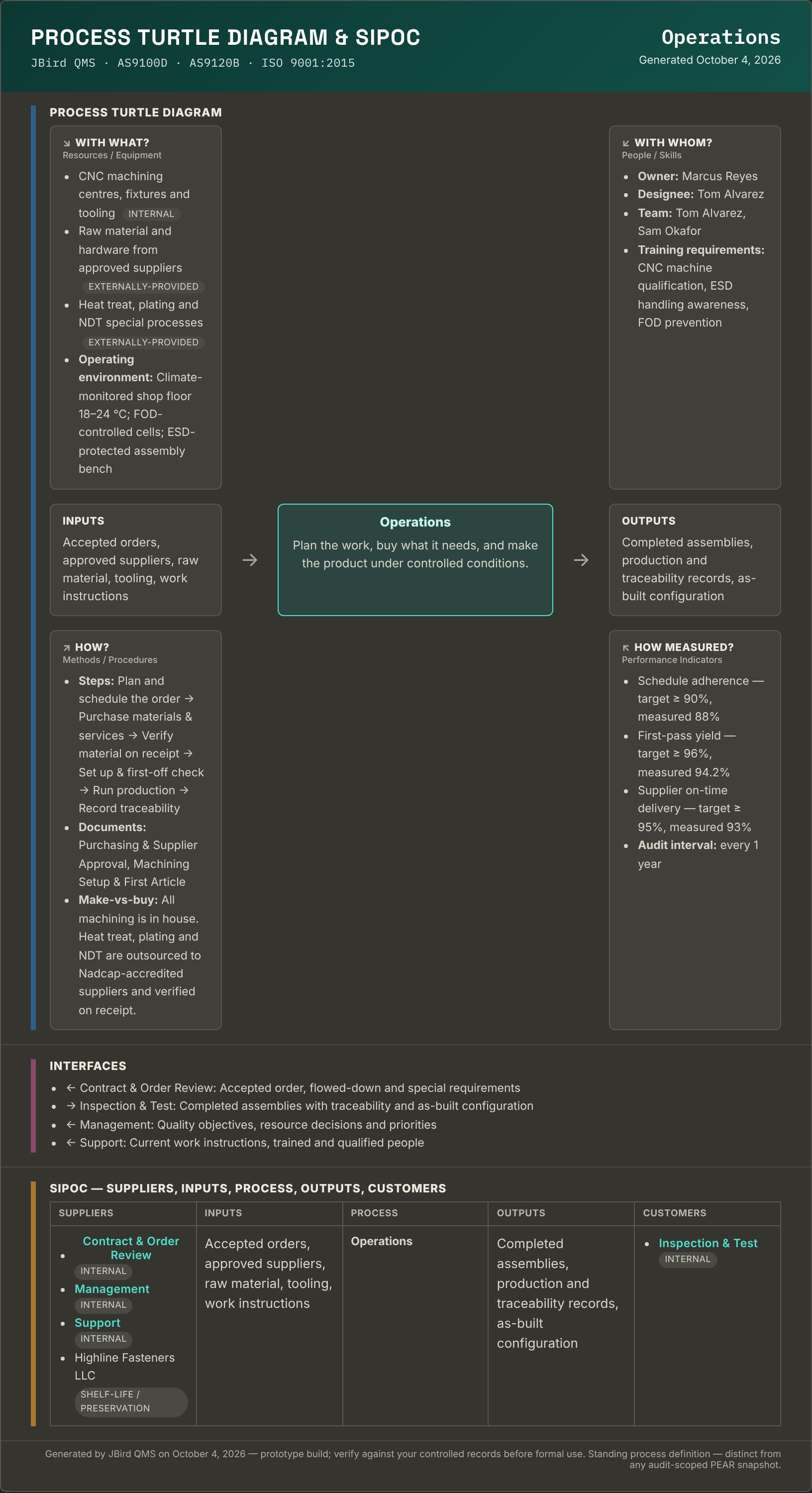
Every process gets a printable turtle diagram and SIPOC, built from the record you already filled in — there is no second form to complete. Every leg: Inputs, Outputs, With What (equipment and operating environment), With Whom (owner, designee, team and their training), How (the sub-steps, plus the procedures and work instructions tagged to that process at their current revision), How Measured (the KPI table and the audit interval), and the process itself in the centre.
Beneath the turtle, the process's interfaces — each one showing its direction, the process at the other end, and what flows between them. Support processes are included here even though they are deliberately not drawn on the interaction map, because an auditor assessing Support still needs them.
The SIPOC underneath resolves suppliers and customers the honest way: anyone you have actually linked — a shelf-life supplier, a calibration provider, a contract-review customer — appears by name, and where no real link exists yet it falls back to the upstream or downstream process from your interaction map and labels it Internal. An empty leg says so rather than rendering blank, so a thin process definition reads as a gap you can go and close.
The four things an auditor has to record on a PEAR are inputs, outputs, activities and interfaces — so those are exactly the four this page leads with, in a form you can read straight across into the PEAR. JBird pre-fills them there for you as well, from the same source, so the two never disagree.
It is a standing view, not an audit snapshot — open it any time, print it, hand it to an auditor who asks how a process actually runs. Distinct from the PEAR, which is frozen to the audit it belongs to. On screen it follows whichever theme you work in; printed or saved to PDF it always comes out on white, so the copy in the auditor's hand doesn't depend on who exported it.
Click to enlarge.
A three-step wizard per entity — paste or upload a CSV, map your columns, then a dry-run preview that says what each row will do before a single record is written. Covers people and training, suppliers, equipment and calibration, documents, NCR/CAPA history and customers.
Issues log, interested parties with stakeholder mapping and RACI, and the QMS scope with the 9101 not-applicable justification cross-check.
Every customer, statutory, regulatory and internal requirement you've taken on, with where it came from and what satisfies it.
Objectives with a cascade view down to the process KPIs that actually measure them, referenced to the real SCMH 7.11.2 source.
Assessment and treatment, with actions that land in the master Action Tracker rather than dying in the register.
The aerospace addition to clause 8 — risk carried through the work itself, not just a register kept alongside it.
Safety-critical items and a safety event log, feeding the safety performance input management review already asks for.
Standing approval records for special processes, first article inspections that print as AS9102 Forms 1, 2 and 3, and new capability evaluation.
Design projects with the 8.3.2 planning checklist, inputs, reviews and verification, outputs with critical-item flagging, and a change log.
Planned changes to the QMS with their risk assessment, so clause 6.3 isn't a paragraph in the manual with nothing behind it.
Both registries, with an 8.4.1.1 external provider control record on every supplier — approval status and who decided it, scope of approval, periodic performance review, certificate on file — a scorecard per supplier worked out from the receipts you post against its purchase orders (on-time delivery, conformity and, if you choose, PPM rejected) with every target and rule left blank until you set it, and bulk import when you're bringing an existing list across. Counterfeit prevention (8.1.4) sits here in its proactive form: an authorized/original-source flag and obsolescence monitoring per provider, alongside the reactive suspect-part controls in NCR/CAPA.
A review record per customer order, checklisted against the standard's own requirements, with any negotiated differences noted and the decision retained. Changes to an accepted order get their own log with an acknowledgment step, so "the customer changed the spec" leaves a trail.
The step before an order exists. A quote per customer with revision-bearing line items — part number, revision, quantity, unit price, requested due date — and an extended price and running total computed live. Status runs requested → quoted → revised → won, lost or expired, with the reason kept when it is lost, and a re-quote log so a third revision does not erase the first two. A unit price entered as free text ("TBD") declines to compute rather than quietly inventing 0.00.
The order itself, optionally carried over from the quote that won it, with the customer's PO number, received date, acknowledgment fields and how the order arrived — portal, email, EDI — with attachments. A Contract & Order Review links to the order it reviewed rather than to a typed reference, so the review, the order and the quote behind it are one chain instead of three documents that mention each other.
Components per part number — quantity per, unit of measure, reference designator — linked into the Inventory part master by part number rather than retyped, so a component's on-hand quantity is one click away from the BOM that calls for it.
The operation sequence a part follows through the shop — one of the "route cards, parts lists, travelers, control plans" clause 8.5.1 names as documented information a production organization is expected to hold. Each operation can name the special process approval, required asset and required training role that already govern it elsewhere in the system.
The production order itself, worked from a queue or a status board, with on-hold and cancelled work kept out of the flow rather than cluttering it. A Traveler for the execution record is created from the Work Order it belongs to.
The execution record a Work Order's router actually runs against — each operation a snapshot of the router at the moment the Traveler was created, so a later router edit never rewrites history. Once the organization has named a Quality Gate Administrator, calibration, special-process and training gaps block sign-off rather than merely warn; a blocked step can be authorized with a written reason, and the override covers only the finding it saw.
A part master and its ledger — every receipt, issue, adjustment, WIP move and scrap is a ledger entry carrying lot/batch and serial numbers, the same field names an NCR record already uses. On-hand is never entered; it is always the sum of the ledger, and material received but not yet verified is flagged separately rather than blending in with stock already checked.
A dated log per customer across all five things clause 8.2.1 names — information provided, inquiries and orders including changes, feedback and complaints, customer property handling, and contingency requirements. The 8.2.2 intake fields sit on the inquiry entries, so statutory and regulatory requirements, special requirements and any operational risk spotted at intake are captured where the order is taken rather than reconstructed afterwards.
A change to how a process runs — a work instruction, a special-process parameter, tooling, an authorized person — tied to the process it affects, with the reason, the verification done before it went in, who reviewed and approved it, and confirmation it was actually incorporated. Distinct from Change Management above, which is clause 6.3: a change to the QMS itself. Auditors ask why both exist, and the two records answer differently.
The clause 7 family — the people, equipment and knowledge the processes need in order to work.
7.1.3 · 7.1.5
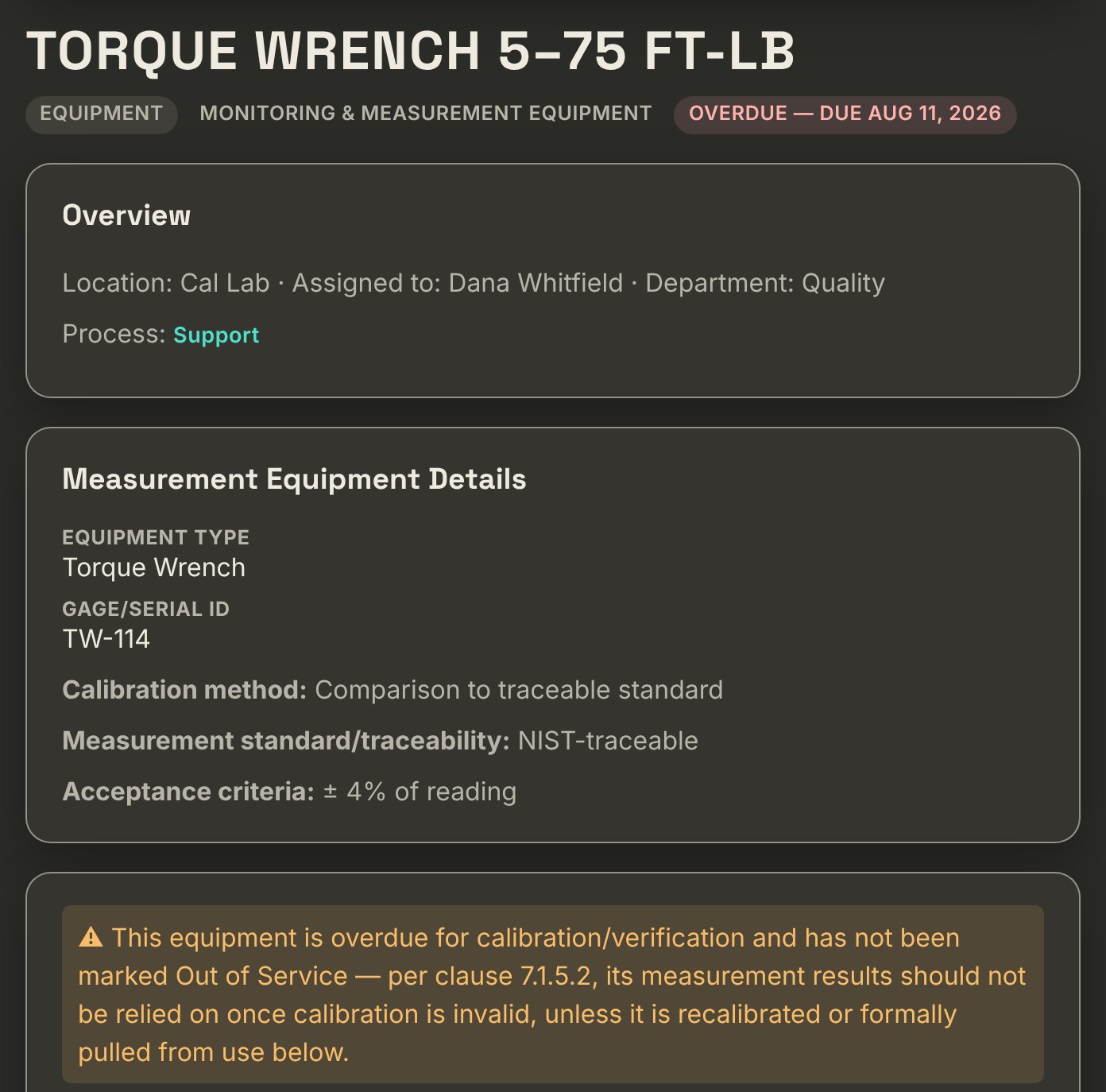
Flag anything used to verify conformity as monitoring and measurement equipment and JBird tracks its whole calibration life: interval, method, traceability, acceptance criteria, and readings at multiple reference points for internal calibrations.
Due status is computed live from the calibration log — never a manually-set flag. Overdue equipment carries a clause 7.1.5.2 warning, an out-of-tolerance finding prompts an impact assessment on previous measurement results, and a formal out-of-service quarantine log records what was pulled and when.
Your organization chart, plus roles, responsibilities and authorities mapped to the clause 5.3 requirements they satisfy.
Training roles, records and effectiveness — including the per-process competency requirements defined on the process itself.
What the organization knows and how it gets it, with a repeatable review log for clause 7.1.6's "changing needs and trends".
Time and condition-limited stock with expiration computed live — from an explicit date, or a manufacture date plus a shelf-life duration — using the same due/overdue discipline as calibration. Never a flag somebody remembered to set. Matters most for AS9120B stockists.
Property belonging to a customer or an external provider while it is in your control — tooling, material, a test article, technical data under an NDA — identified, verified on receipt and tracked through to return or incorporation. Anything lost, damaged or found unsuitable is logged as an incident against the item, and the module flags anything flagged but not yet reported to its owner, which is the part of the clause that actually bites.
What gets communicated, when, with whom, through what channel and by whom — the five things clause 7.4 asks for, in one register, with the two-way feedback mechanism recorded alongside. Standing and recurring communication lives here; a single change's communication plan stays on that change.
Documented information under control — which is where a surprising share of findings start.
Procedures, work instructions, forms, policies and scope statements with revision history, approval state and links to the process they belong to. Every approval keeps the text it approved, so Compare revisions shows exactly what changed between two approved revisions.
Retention periods per document, with eligibility computed rather than tracked by hand on a schedule nobody revisits.
Clauses 4 through 10 with the AS9100D, AS9120B and AS9110C sector requirements in place, each clause showing its linked processes and documents. Editable where your wording should differ from the template. On the clauses that have records behind them, the manual lists those records and can build an evidence pack: one PDF for an auditor with a cover, an index, a full sheet for every record and each record’s attached files right behind its sheet. Available for calibration, competence, contract and order review, suppliers and purchase orders, release, nonconformance, internal audit and management review.
Where JBird is furthest ahead of a spreadsheet — and where the 9101 methodology actually shows up.
8.5.1.2 · 8.5.1.3 · 8.5.1.4
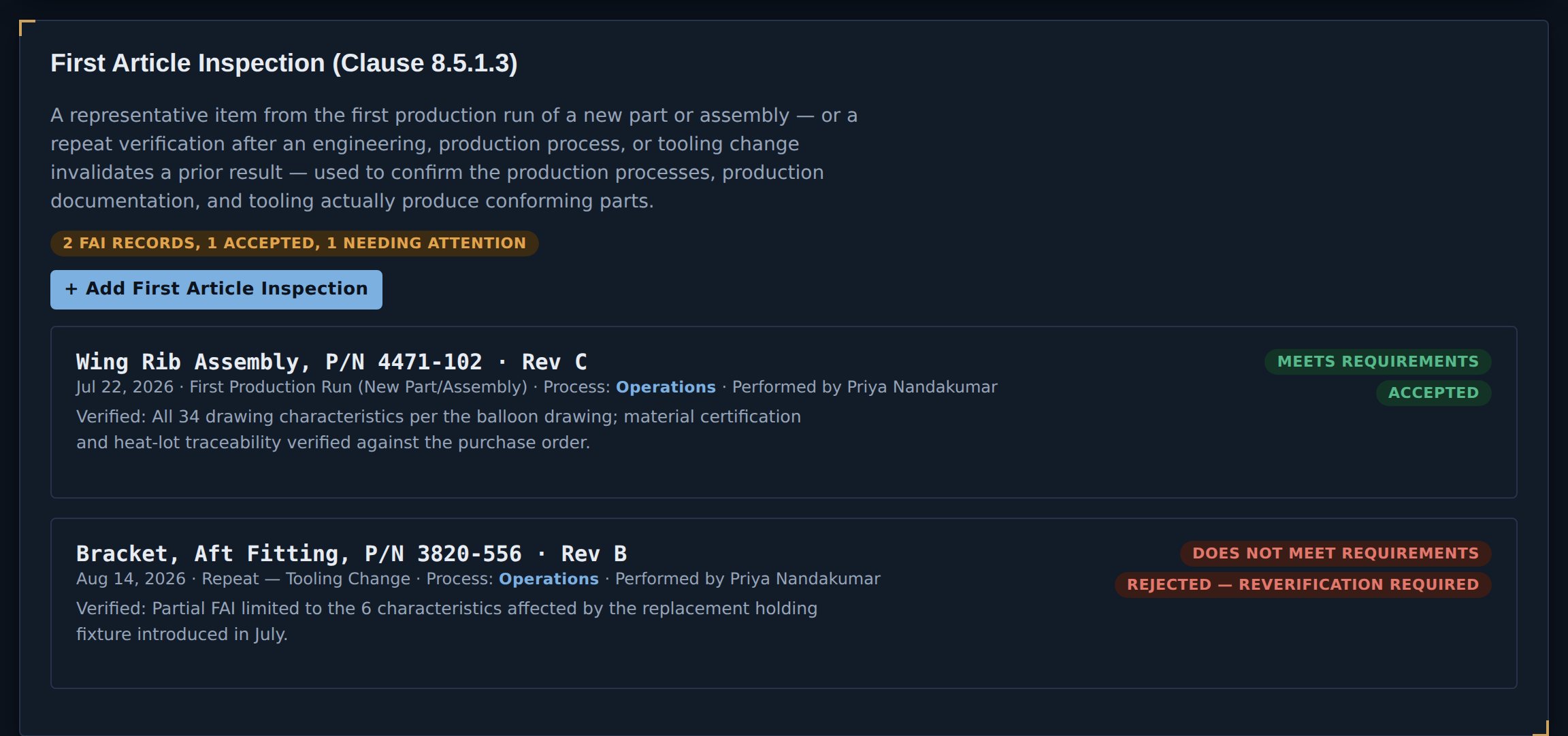
"How do you handle first articles" is close to the first question a manufacturer asks, and FAI is one of the most consistently sampled records in a real AS9100 audit. Each record carries its own FAI report number, the part, drawing and configuration, what triggered it — a new part, an engineering change, a process change, a tooling change, a change of source, a lapse in production, or an event that may have affected the process, which is the standard's own list — whether it is a full or a partial FAI, the result, the disposition, and who performed it. A partial FAI can point at the full one it amends.
Characteristics are records, not a paragraph. Each one carries its reference and drawing zone, the requirement, nominal, tolerance, actual result, inspection method and gauge, and links to the nonconformance raised against it if it failed. Materials and special-process sources sit beside them, each pointing at the approved supplier or the standing special-process approval it came from — so a source on the form is the same record the supplier register already holds, not a name retyped onto a form. The whole thing prints as AS9102 Forms 1, 2 and 3.
A rejected first article isn't hidden. It shows as does not meet requirements with reverification required, and the header count tells you how many of your FAIs still need attention — because the ones that failed are the ones an auditor will ask to see.
Alongside it: a standing approval record for each special process — heat treat, welding, NDT, composites — with its approval criteria, qualified people and a revalidation due date, and evaluation of a new capability before it's first performed, for AS9110C organizations.
Click to enlarge.
9.2 · IAQG 9101
An audit programme with a configurable multi-year cycle, per-process audit intervals, and coverage computed from real completed-audit history — so "which processes are overdue for audit" is a fact, not a guess.
Inside an audit: a QMS Process Matrix (9101 Form 2) marking each clause Conforming, Nonconforming, Not Evaluated or Not Applicable per process, with an objective evidence summary per clause section. A PEAR (9101 Form 3) per process, whose inputs, activities, outputs, interfaces and KPIs come straight from the process map — pre-filled, then yours to edit, and frozen once the audit is locked. And an auditor's questionnaire generated per process from its documents, outputs and tagged clauses, with a standing clause 7.3 personnel-awareness check.
The 9.3.2 inputs assembled from what the system already knows — customer satisfaction, external provider performance, requirements register status, objectives status, risk and opportunity effectiveness — rather than retyped into a slide deck once a year.
Every clause of every standard you hold, status computed from the processes and documents actually tagged to it, filterable per standard.
Readiness per sector scope, open findings against their deadlines, calibration recall, overdue audits — all computed, none of it typed in.
Two-factor enrolment for the approver role, a read-only view of the audit log, and a record of every signing attempt including the failed ones. These need real accounts behind them, so on a hosted deployment they are here and in the demo the tab says so rather than showing an empty panel.
Configuration items tied to the requirement they're built against, with every change logged and linkable to a real Change Management record. Then one release record per decision — product, serial, work order, evidence of conformity. Only people holding an active acceptance authority can be named as releaser, and AS9110C's flight-safety attestation and AS9120B's certifying statement appear only for the standards you actually hold.
Perception monitoring as the clause actually asks for it — surveys, direct feedback, meetings, compliments, warranty claims, dealer reports — with an improvement plan on any entry showing a real deficiency. This register feeds management review, rather than a count of complaints standing in for it.
Clause 9.1.3's seven lettered requirements — conformity, customer satisfaction, QMS performance, whether planning worked, the effectiveness of actions on risks and opportunities, external provider performance, and the need for improvement — each taking a point-in-time snapshot from the data already in the system, against which you record the conclusion. The analysis is the act the clause asks for; the snapshot just stops it starting from a blank page. Feeds management review as a live input.
What happens after something goes wrong, handled in the sequence and on the timeline a registrar expects.
10.2
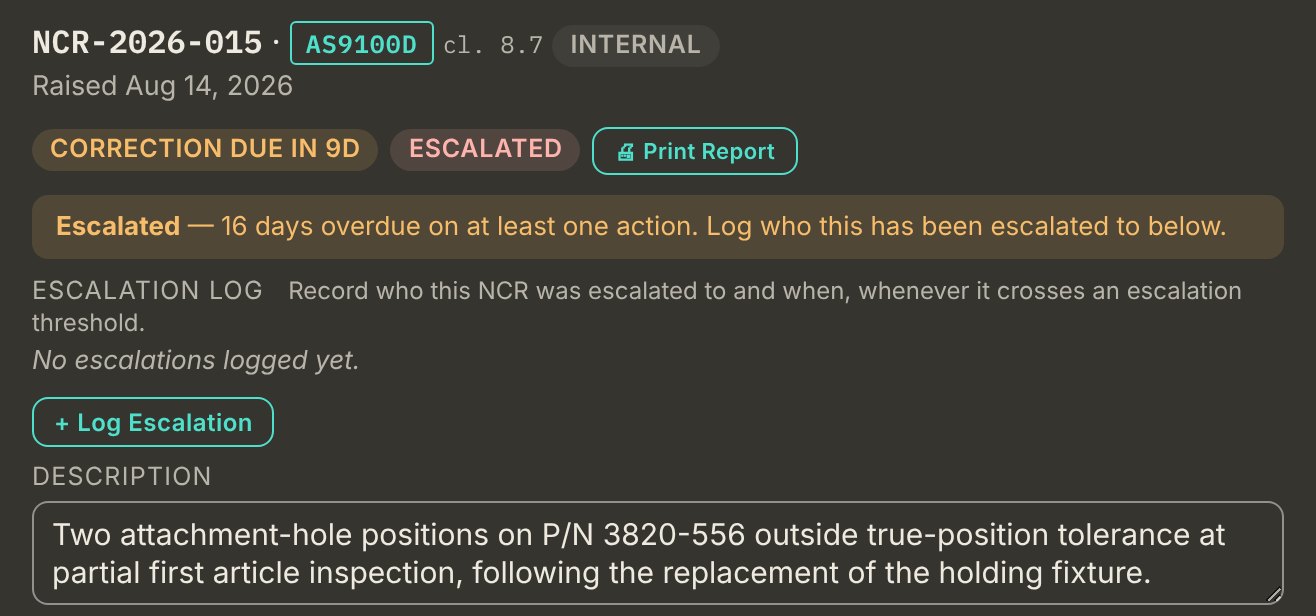
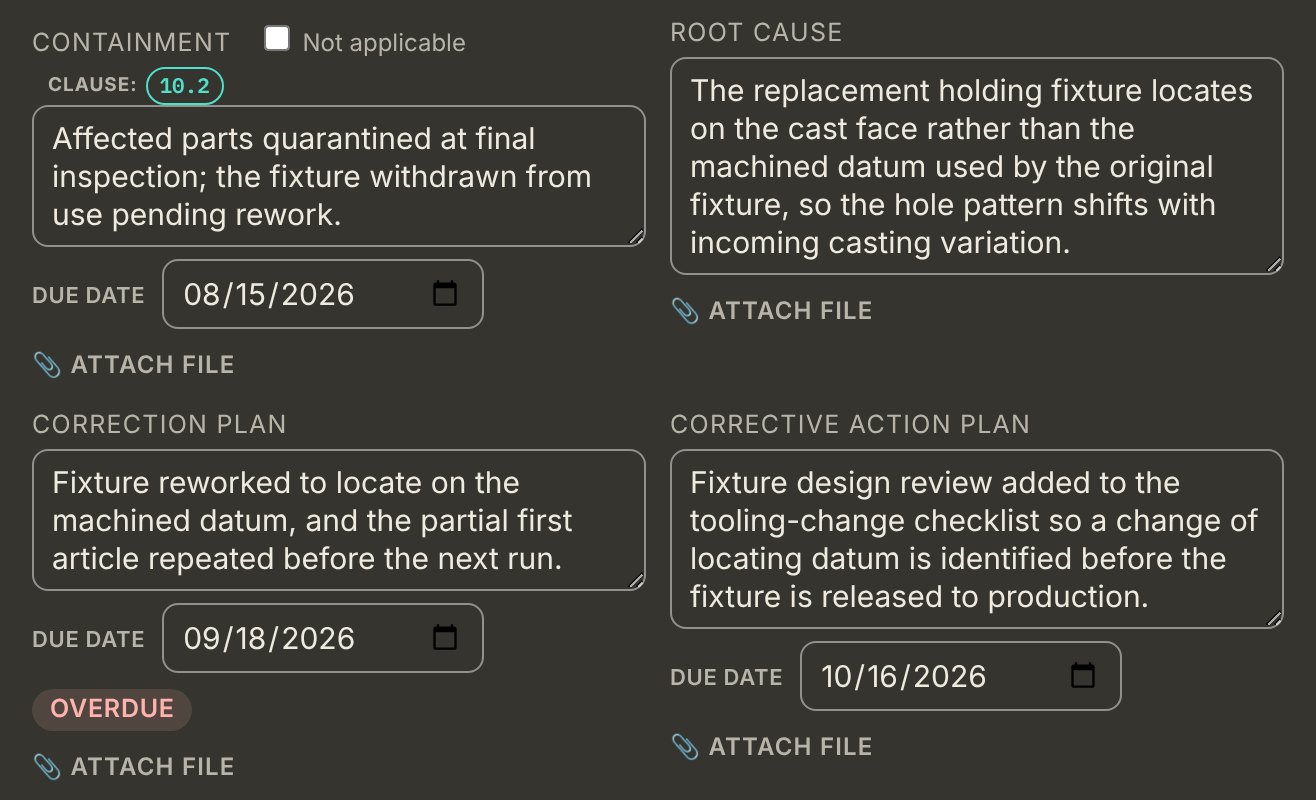
Containment, root cause, correction, corrective action and effectiveness verification, each with its own due date and objective evidence. Two clocks run automatically — root cause and plans, then full implementation of the correction — on the 30 and 60-day cycle most registrars use, or on whatever cycle your registrar or a customer contract sets instead. An item that sits too long escalates on a policy you configure.
Root cause is worked with real tools rather than a free-text box: 5-Whys, fishbone across the standard six categories, fault tree analysis, Pareto and FMEA. Part number, lot, serial and work order are captured so recurrence across related nonconformances can be detected.
One master list of every action the system has generated — from risks, management review, audits and corrective actions — so nothing is only tracked inside the module that created it.
5-Whys, fishbone, fault tree, Pareto and FMEA, attached to the nonconformance they belong to rather than living in a separate spreadsheet.
A flag button on every screen. It captures what you were looking at, what went wrong and an optional screenshot, and files it into a Feedback register you can work through and resolve — not an email to us that disappears into a thread. It is how "direct input on what gets built next" stops being a phrase in a pitch and becomes a list with dates on it.
Clause 10.3 asks you to improve the QMS considering the results of analysis and evaluation and the outputs of management review — so this reads both of those live rather than becoming a third register that duplicates them. Every management review improvement action and every 9.1.3 conclusion appears as a candidate; one click tracks it, and from that point it carries its own status and a repeatable effectiveness review of its own. That is the part the clause is actually asking for: improvement monitored as a class over time, not just closed out one incident at a time.
On a hosted pilot · not the open demo
Every approval in a quality system is a claim that a particular person authorised a particular decision. In most small systems that claim is a name typed into a cell, by someone who may or may not be that person, on a record that can be edited afterwards. An auditor's first question about any approval is how you know it's true. On a hosted JBird pilot, the answer isn't a name — it's a signature the person had to be signed in to make.
Document approval (7.5.2), configuration item change history (8.1.2), control of production and service provision changes (8.5.6), design and development outputs (8.3.5), and the deciding authority on a nonconforming output (8.7.1) — the record an auditor samples most.
In each, the approver field isn't a list of everyone in the organization. It shows the email you are signed in as, and nothing else. The identity written to the record is taken from the session on the server side, not from the form the browser sent, so it can't be changed by editing the page.
An attestation statement, shown at the moment of signing and stored on the record itself, so what was attested to is part of the evidence rather than a policy somewhere else. A tick to acknowledge it. And your password again, even though you are already signed in.
Get the password wrong and nothing is recorded but the attempt. Get it wrong five times in fifteen minutes and signing locks — and the lockout is logged too, so a run of failed attempts on someone's account is visible rather than invisible.
Before any of that, an approver has to have two-factor authentication switched on. It isn't optional for the role. Someone who hasn't set it up can still use the system normally — they simply can't approve, sign or reject anything until they do.
Change the decision after it was signed — a different disposition on a nonconformity, a different design output — and the signature is cleared. The record cannot show an approval for a decision nobody approved. Whoever changed it has to sign again, as themselves.
This is narrower than "any edit clears it", and deliberately so: the attestation is about who authorised the decision, so editing the rationale behind an unchanged decision doesn't invalidate anything.
Every save to your organization's data is recorded with who made it, when, and which kinds of record changed. That entry is written by the database itself at the moment the save lands — not sent by the browser, not written by JBird. The application holds read access to that log and nothing else.
Which is the point: no signed-in user of the system, an approver included, can add, alter or erase an entry, however they get at it.
The limits of that, stated plainly
This applies to a hosted pilot with named user accounts. The open demo on this site runs as a single file in your browser with no accounts at all, so it shows the original pick-a-name approver field — there is no identity there to bind a signature to, and pretending otherwise would be the wrong kind of demo.
The log is tamper-evident against every signed-in user of the application. It is not immune to whoever holds the database's own administrative credentials, which is true of any table in any system and is worth saying rather than leaving implied.
And asking for a password at signing — or requiring two-factor of approvers — is not an AS9100 requirement. The standard asks who authorised the work, not how you proved they were present. Both are here because a signature nobody had to prove is a signature worth less — deliberate choices, not compliance necessities, and not a claim of conformity to any electronic-records regulation.
Honest scope
JBird was built system-level first — context, planning, resources, documentation, audit, management review and improvement — then the operational clauses, highest audit risk first. As of September 2026 the clause backlog from both gap analyses is closed. That is worth stating precisely, because "no gaps left" is the kind of claim this site exists not to make carelessly.
Clause 4 (context, interested parties, scope, processes), clause 5 (leadership, roles), clause 6 (risk, objectives, change), clause 7 (people, infrastructure, calibration, knowledge, competence, awareness, documented information), clause 8.3 (design and development, from planning through inputs, reviews, outputs and change control), clause 9 (gap analysis, internal audit with the 9101 forms, customer satisfaction, management review, and a monitoring plan on every KPI — 9.1.1) and clause 10.2 (nonconformity and corrective action).
From clause 8: operational risk management (8.1.1), product safety (8.1.3), counterfeit part prevention in both its reactive and proactive halves (8.1.4), customer communication and requirements determination (8.2.1 and 8.2.2), special process approval and first article inspection (8.5.1.2 through 8.5.1.4), external provider control (8.4), configuration management (8.1.2), contract and order review (8.2.3 and 8.2.4), acceptance authority media (8.5.2), customer and supplier property (8.5.3), preservation and shelf-life (8.5.4), control of production and service provision changes (8.5.6), release of product (8.6), and control of nonconforming output (8.7).
Plus communication (7.4), analysis and evaluation (9.1.3) — which feeds management review as a live input rather than a figure someone retypes — and continual improvement (10.3), which reads both of those and tracks what you decide to act on through to an effectiveness review.
It means nearly every clause of AS9100D, AS9120B, AS9110C and ISO 9001:2015 now has a real mechanism behind it — a record with the fields the clause asks for, not a heading in a manual. The two most recent to close, both in September, were validation of equipment, tools and software (8.5.1.1) and information for external providers (8.4.3).
Four clauses still have no dedicated place to record evidence, and they are worth naming. They are described in the manual and assessed in the gap analysis, but nothing in the app holds a record against them: 8.4.2 on the type and extent of control applied to an external provider, 8.5.5 on post-delivery activities, 8.1.5 on suspected unapproved parts — which applies to AS9120B distributors as well as AS9110C — and 8.1.6 on installation of approved parts, AS9110C only. For an AS9100D shop only 8.4.2 and 8.5.5 are live gaps; the app itself lists the other two among the clauses that can never apply to a 9100D organization. Two that used to be on this list have since been built — 8.5.1.1 now has its own Equipment, Tools & Software Validation register on the Infrastructure & Equipment tab, separate from the calibration log because validating a fixture or a CAM program for its intended use is not the same requirement as calibrating a gage; and 8.4.3 is a maintained Supplier Terms & Conditions document covering the six items the clause lists, plus a per-supplier record of how those terms actually reached that provider.
It does not mean finished. This is a prototype build with no production customers yet. Every module has been checked against the standard's own text and against what gets sampled in a real audit, by someone who conducts them — but no amount of that substitutes for a quality manager using it on their own system for a year and finding the places it does not fit. There is no version of this software that has survived that yet. What is left to build is not a list of clauses; it is the depth that only real use exposes.
So the invitation is unchanged, and now it is the whole point: open the demo and try to break it. If a record you would ask an auditee for isn't there, or is there in a shape that would not survive a real audit, that is a genuine finding and we would much rather have it from you than from a registrar.
Why that order
The system-level clauses are the ones every organization shares, whatever it makes. They're also where a paper QMS hurts most, because they cut across everything. The operational clauses are being closed in order of how often they actually get sampled in an audit — release records, acceptance stamps and configuration control first, because those are the ones an auditor asks for on nearly every visit.
Ahead of that, though, come the clauses that separate AS9100D and AS9110C from plain ISO 9001 — operational risk management, product safety, and special process approval with first article inspection, all now built. An evaluator who knows the standards checks those early, precisely because a relabelled generic quality tool has no reason to have them, and FAI in particular is one of the most consistently sampled records in a real AS9100 audit. Design and development (8.3) was the largest clause still open and the only one a shop that designs its own product cannot scope out; it is now built, and so is the operational half of clause 8 that followed it.
The last two items were deliberately last: both extended registers that already worked, and neither was a control an auditor would have found absent. With them closed, what a pilot organization shapes is no longer which clause gets built next — it is whether the ones that exist hold up against a real system, which is a harder and more useful question.
Pilot program
45 modules are already built and working. Pilot organizations get the system at no cost during development, direct input on what gets built next — there is a Report a Problem button on every screen, and it goes to a register we work through — and a migration path when the IA9100 revision lands.